Feed filters control which feed items are posted to Discord. When filters are enabled, only items matching the defined conditions will be sent as messages. Items that do not match are silently discarded.
Filters can be set up at two levels:
- Bot-level filters apply to all feeds in a bot. Configure these in the bot settings page under "Feed filters".
- Feed-level filters apply to a single feed. Configure these in the feed properties under "Filters".
When both bot-level and feed-level filters are defined, an item must match both sets of filters to be posted.
Creating a filter
To create a filter:
- Navigate to the feed or bot settings to filter.
- Click "Edit" next to the Bot filters or Feed filters property.
- Make sure the Enable filters checkbox is checked.
- Click "+ Add condition" to add a filter condition.
- Select a field, an operator, and enter a value.
- Click "Save" to apply the filters.
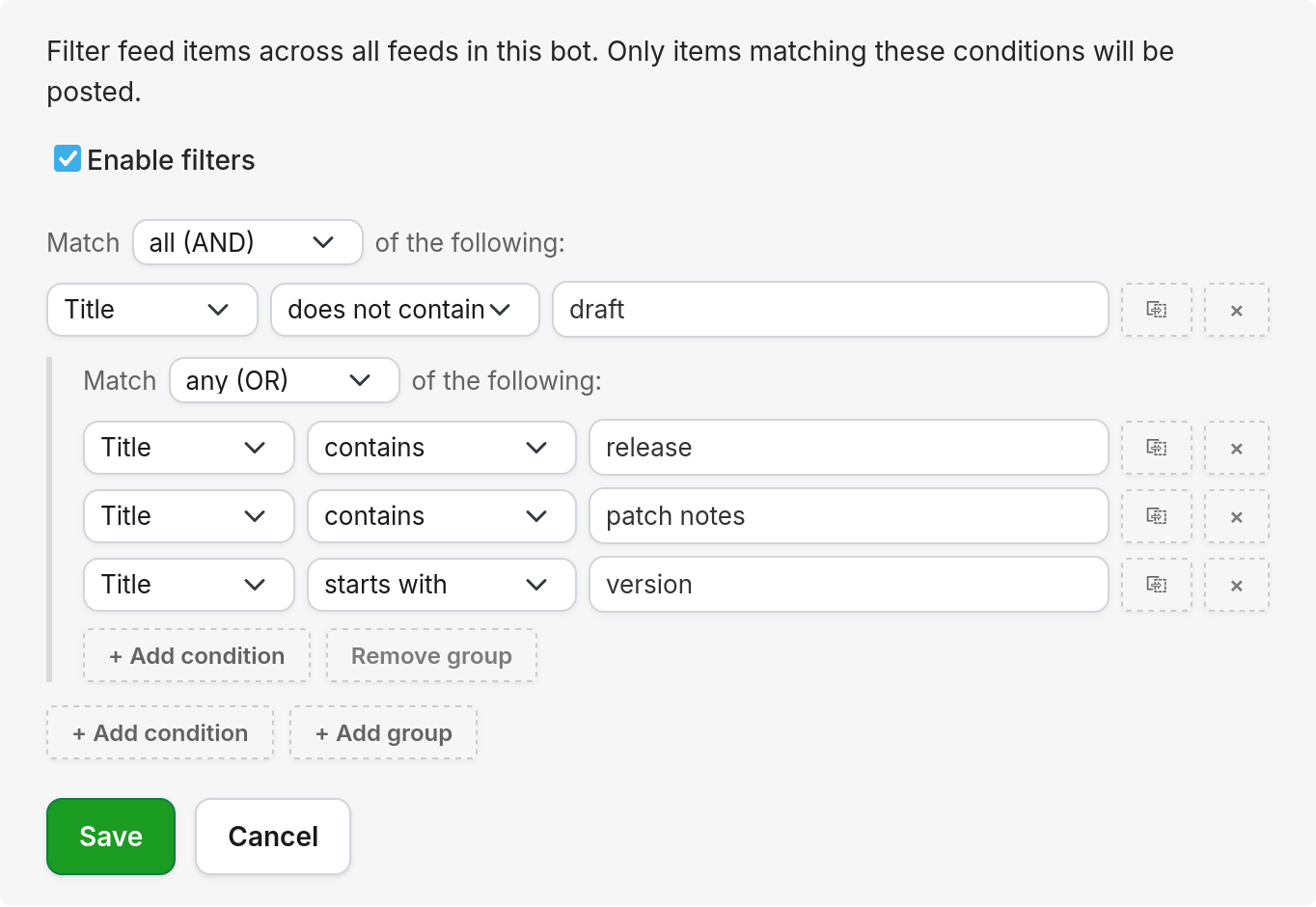
Each condition consists of three parts: the field to check, the operator to use for comparison, and the value to compare against. All comparisons are case-insensitive.
Fields
The following feed item fields can be used in filter conditions:
| # | Field | Description |
|---|---|---|
| 1 | Feed title | The title of the feed itself (not the individual item). |
| 2 | Author | The author of the feed item, if provided by the feed. |
| 3 | Title | The title of the feed item. |
| 4 | URL | The link address of the feed item. |
| 5 | Description | The description or summary of the feed item. |
Operators
The following comparison operators are available:
| Operator | Description | Example |
|---|---|---|
| contains | Matches if the field contains the value anywhere. | Title contains "release" matches "New Release v2.0" |
| does not contain | Matches if the field does not contain the value. | Title does not contain "draft" excludes "Draft: upcoming changes" |
| equals | Matches if the field is exactly equal to the value. | Author equals "Readybot" matches only "Readybot" |
| starts with | Matches if the field begins with the value. | Title starts with "Breaking" matches "Breaking News: ..." |
| ends with | Matches if the field ends with the value. | URL ends with ".pdf" matches links to PDF files |
Combining conditions with groups
Multiple conditions can be combined using groups. Each group has a matching mode:
- Match all (AND): every condition in the group must match for the group to pass. Use this to narrow down results.
- Match any (OR): at least one condition in the group must match. Use this to widen results.
The matching mode can be changed using the dropdown at the top of each group, which reads "Match all/any of the following".
Nested groups
Groups can be nested inside other groups to create more complex logic. Click "+ Add group" to add a nested group. Groups can be nested up to 2 levels deep.
For example, to match items that are either by a specific author OR contain certain keywords in the title:
- Set the top-level group to Match any (OR).
- Add a condition: Author equals "John".
- Add a nested group set to Match all (AND).
- Inside the nested group, add: Title contains "release" and Title does not contain "draft".
This will match items where the author is "John", or items whose title contains "release" but not "draft".
Managing conditions
Each condition can be managed using the buttons next to it:
- Click the duplicate button to copy a condition.
- Click the × button to remove a condition.
- Groups can be removed using the "Remove group" button. A confirmation is required.
Enabling and disabling filters
Filters can be temporarily disabled without deleting them. Uncheck the Enable filters checkbox and save. The filter conditions will be preserved but no filtering will be applied. Re-enable them at any time by checking the box again.
If no conditions have been added to a filter, all items will pass through regardless of the enabled state.
Bot-level vs. feed-level filters
Filters can be configured at two different levels, and both apply simultaneously:
| Level | Location | Scope |
|---|---|---|
| Bot-level | Bot settings page → "Bot filters" | Applies to all feeds in the bot. |
| Feed-level | Individual feed properties → "Feed filters" | Applies to that feed only. |
When both are active, a feed item must pass both sets of filters to be posted. Bot-level filters are useful for broad rules (e.g. excluding items containing certain keywords across all feeds), while feed-level filters are useful for rules specific to a single source.