Readybot is a free Bluesky to Discord bot that automatically sends new Bluesky posts to your server. Follow any public Bluesky profile and get notified in your Discord channels whenever they post. Here's how to set it up.
1. Connect your Discord server
Open the Readybot Dashboard and click "Add server" to connect the Discord server where you want Bluesky notifications to appear.
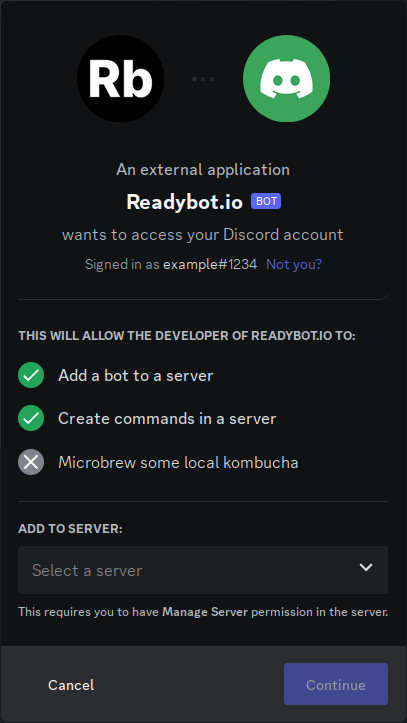
Select your server and click "Continue", then accept the permissions Readybot needs and click "Authorise".
2. Create a Feed Bot
Back on the Dashboard, click "Add bot" to create a new Feed Bot. Give it a name (e.g. "Bluesky Updates") and select the default Discord channel where new posts will appear.
3. Add a Bluesky profile
In the Feed Bot page, click "Add feed" and select Bluesky as the feed type. Enter the Bluesky handle of the profile you want to follow:
username.bsky.social
Readybot works with all public Bluesky profiles, including those using custom domains (e.g. user.example.com).
4. Wait for the first notification
Readybot checks Bluesky feeds on a regular interval. The first notification typically arrives within a few minutes when the profile publishes a new post.
🔍 Not seeing messages? Check these common issues:
- Refresh the bot page and check the feed status for any errors.
- Make sure the Discord channel still exists and Readybot has permission to post in it.
- The profile may not have posted since you added the feed. Readybot only sends notifications for new posts.
- Verify the handle is correct and the profile is public.
5. Add more profiles
Repeat step 3 for each Bluesky profile you want to follow. You can route different profiles to different Discord channels by creating separate Feed Bots.
Tips & advanced usage
- Filter posts: Use feed filters to only forward posts containing specific keywords or exclude certain topics.
- Custom message appearance: Customize the bot appearance to match your server's style.
- Faster updates: Free accounts check feeds every 10 minutes by default. Upgrade to a paid plan for checks every 5 minutes, or every minute on the Premium Membership plan.
- Mention roles: With a paid plan, you can notify users and roles whenever a new post appears.
Frequently asked questions
Is this the same as connecting my Bluesky account in Discord settings?
No. Discord's built-in Connections setting only adds a Bluesky badge to your personal profile. Readybot is different: it automatically posts new Bluesky posts from any public profile into a Discord channel, so everyone in your server sees them. See the Bluesky to Discord bot for an overview.
Does Readybot support custom Bluesky domains?
Yes. Bluesky allows users to verify their identity with a custom domain (e.g. user.example.com instead of user.bsky.social). Readybot accepts both formats.
Are reposts and replies included?
Yes. Reposts and replies are automatically included in the feed with rich embedded data.
How often does Readybot check Bluesky?
The check interval depends on your plan. Free accounts check every 10 minutes by default; paid plans check faster - down to 5 minutes, or every minute on the Premium Membership plan.
Readybot.io is not affiliated with or related to Bluesky. Readybot does not make any guarantees to the availability of the Bluesky service and feeds.