Readybot is a free X (Twitter) to Discord bot that sends X (formerly Twitter) tweet notifications to your server. Follow any public X profile and get automatic alerts in your Discord channels whenever they post. Here's how to set it up.
- Follow up to 2 X profiles for free and get tweet alerts in Discord.
- Filter tweets by content or author with a paid plan, so only relevant posts reach your server.
- Customize message appearance, mention roles, and route different profiles to different channels.
1. Connect your Discord server
Open the Readybot Dashboard and click "Add server" to connect the Discord server where you want tweet alerts to appear.
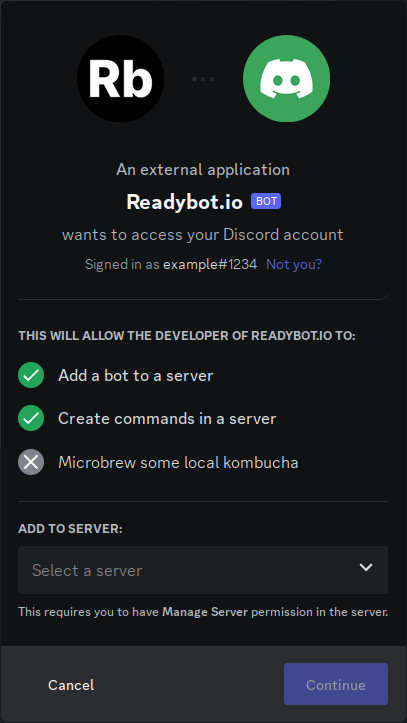
Select your server and click "Continue", then accept the permissions Readybot needs and click "Authorise".
2. Create a Feed Bot
Back on the Dashboard, click "Add bot" to create a new Feed Bot. Give it a name (e.g. "Tweet Alerts") and select the default Discord channel where tweet notifications will be posted.
3. Export your X authentication cookies
X does not provide public feeds, so Readybot needs your X authentication cookies to read tweets on your behalf. Follow the Export your X authentication cookies guide to get them.
Once you have the cookies, paste them into the Readybot Dashboard when prompted. Readybot stores your cookies securely and only uses them to read tweet timelines.
4. Add an X profile to follow
In the Feed Bot page, click on the "X (Twitter)" category and choose "Add feed". Enter the X username of the profile you want to follow:
https://x.com/username
Tip: you can enter just the username (e.g. username) and the full URL will be autofilled.
5. Wait for the first alert
Readybot checks for new tweets on a regular interval. The first notification typically arrives within a few minutes when the profile publishes a new tweet.
🔍 Not seeing messages? Check these common issues:
- Refresh the bot page and check the feed status for any errors.
- Make sure the Discord channel still exists and Readybot has permission to post in it.
- The profile may not have tweeted since you added the feed. Readybot only sends notifications for new tweets.
- Verify the username is correct and the profile is public.
- Check that your X authentication cookies are still valid. If you logged out of X.com, you'll need to re-export your cookies.
6. Add more profiles
Repeat step 4 for each X profile you want to follow. You can route different profiles to different Discord channels as you wish.
Tips & advanced usage
- Separate by topic: Create one bot for news accounts posting to
#newsand another for gaming accounts posting to#gaming. - Filter tweets: With a paid plan, use feed filters to only forward tweets containing specific keywords.
- Custom message appearance: Customize the bot appearance to match your server's style.
- Mention roles: With a paid plan, you can notify users and roles whenever a new tweet is posted.
- Use a dedicated X account: Create a separate X.com account specifically for Readybot to keep your personal account separate.
Frequently asked questions
How quickly are tweets delivered to Discord?
Tweet notifications typically arrive within a few minutes of the tweet being published. The exact speed depends on your selected update interval and X's rate limits.
What happens if my X cookies expire?
If you log out of X.com or your session expires, Readybot will no longer be able to read tweets. Any X.com feeds in your bot will be disabled, and you will see an error on the bot page. Simply re-export your cookies to restore access.
What are X rate limits?
X limits how often an account can make requests. Setting a very low update interval may hit these limits, temporarily preventing feeds from updating. Learn more about rate limits in the authentication guide.
How many X profiles can I follow?
Free accounts can follow up to 2 X profiles. Paid plans offer higher limits.
Readybot.io is not affiliated with or related to X Corp. Readybot does not make any guarantees to the availability of the X service.